
ftak
Instant definitions, summaries, and maps in browser tooltips
Screenshots


 React
React Typescript
 Next.js
 Supabase
What is ftak?
ftak is a browser add-on designed to help readers understand text without breaking their reading flow. When reading articles, documents, or study materials online, encountering unfamiliar vocabulary or unfamiliar names often forces users to open new search tabs, copy terms, and jump between windows. This constant tab switching fragments focus and slows down comprehension.
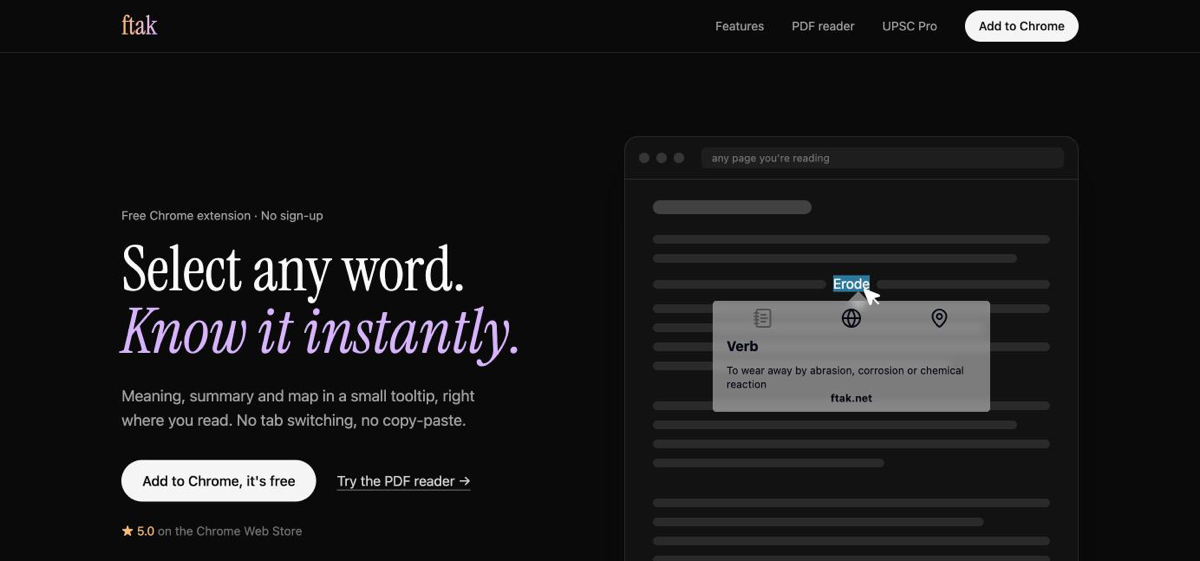
The extension solves this problem by displaying dictionary definitions, Wikipedia-based factual summaries, and interactive location previews directly next to selected text inside a lightweight tooltip. Readers get immediate context on the active webpage without copying text or leaving their current task.
Unlike traditional dictionary extensions that only display single-word lexical definitions, ftak combines vocabulary lookups with broader topical summaries and map cards, functioning across both standard web pages and PDF files inside the browser.
Who is it for?
ftak is built for anyone who spends significant time reading long-form text or technical material online, including:
- Students and researchers reviewing academic papers, reference articles, and online publications.
- Professionals reading industry reports, documentation, and digital PDFs who want to avoid tab clutter.
- Language learners who regularly need fast definitions without halting their reading progress.
- Casual readers who want quick background details on historical figures, unfamiliar terms, or geographic locations.
Key features
- Inline Definitions: Shows clear word definitions directly in an on-page tooltip as soon as a term is selected.
- Contextual Summaries: Generates concise summaries of people, historical events, places, and broad concepts pulled from Wikipedia.
- Interactive Map Previews: Detects geographic place names and presents an inline map preview so users can see locations immediately.
- PDF Reader Support: Operates inside browser-based PDF files, giving the exact same inline selection and lookup abilities on digital documents.
- Tab-Free Interaction: Opens all information within a floating bubble that dismisses immediately when the user clicks elsewhere, avoiding new browser tabs.
- Zero Account Requirement: Works directly upon installation with no account creation, passwords, or personal profiles needed.
How it works
- Highlight any word, phrase, or place name on a web page or PDF by double-clicking or dragging your cursor over it.
- Review the inline tooltip that automatically displays definitions, background summaries, or a map preview.
- Click anywhere off the tooltip to close the box and resume reading instantly.
Use cases
A university student reading a research document in PDF format encounters technical terms and obscure references. Instead of toggling between search engines and the PDF viewer, the student highlights the terms to see instant definitions and contextual summaries directly on the document.
A news reader reviewing international reporting selects an unfamiliar city name. The tool provides a concise background summary and an interactive map showing the location without navigating away from the article.
A non-native English speaker reading long-form essays uses the tool to look up vocabulary definitions on the fly, keeping the reading pace uninterrupted.
Pricing
ftak is completely free to install and use. It does not require a paid subscription, trial period, credit card, or user registration.
FAQ
What platforms does ftak support?
ftak runs as an extension for Google Chrome and functions on standard web pages as well as PDF documents opened in the browser.
Does ftak require an account or sign-up?
No. The extension requires no registration, login, or personal profile to use.
Where does the summary and map data come from?
The extension retrieves factual overviews of people, places, and concepts using summaries from Wikipedia, alongside standard definitions and interactive map previews.
Can I use ftak on PDF files?
Yes, ftak includes built-in support for reading and highlighting text within PDFs directly inside your browser window.
Related products
View all
Daily Random Bible Verse Generator
Tap for a fresh KJV verse, switch translations, then copy it

AntForms
Unlimited free submissions + free analytics + integrations +


Excelerator Password 2.0
Lock and unlock Excel workbooks without opening Excel


More categories
All categories

Launched in Week 7, 2027
See the week
sqr.art
Turn photos into functional, scannable QR codes

KindSlot
Free browser games with XP Points and digital rewards

AI Bikini Generator
Preview swimwear styles on your photo with AI
odoo freelancers
A global marketplace connecting businesses with skilled Odoo