
Appcan
Mobile app security scanning and AI risk insight
Screenshots
Free Trial
Cybersecurity
Mobile Development
Vulnerability Scanner
Built with Next.js
What is Appcan?
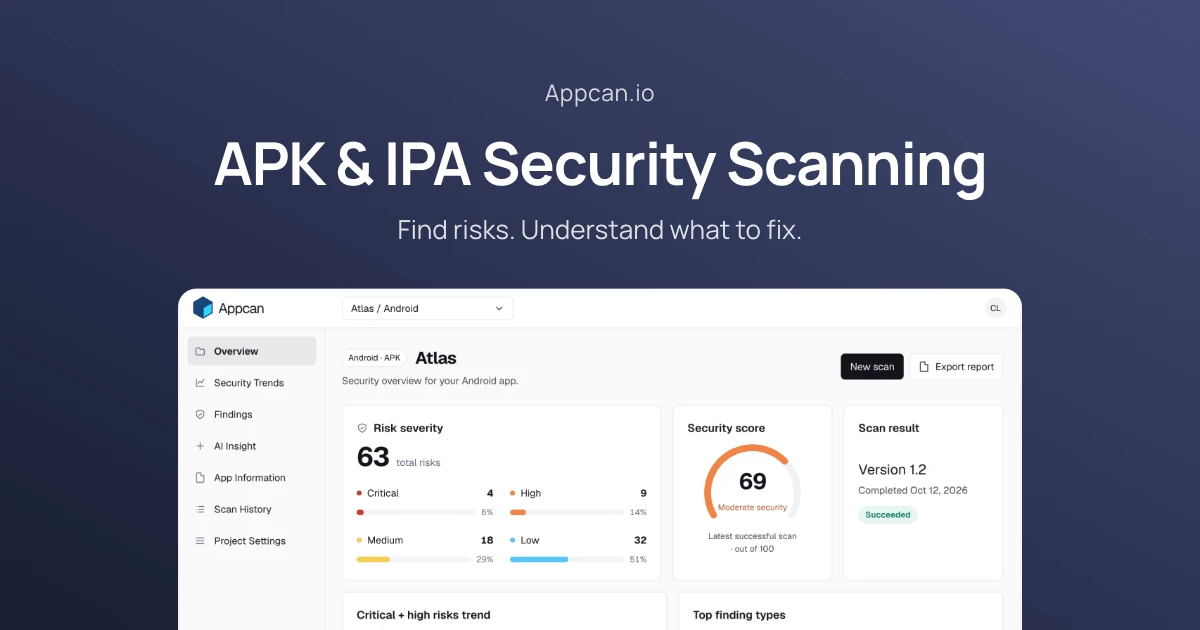
Appcan is an automated security scanner for mobile applications. It examines compiled Android APK and iOS IPA packages to identify security vulnerabilities, misconfigurations, and data leaks without requiring access to source code or SDK integrations.
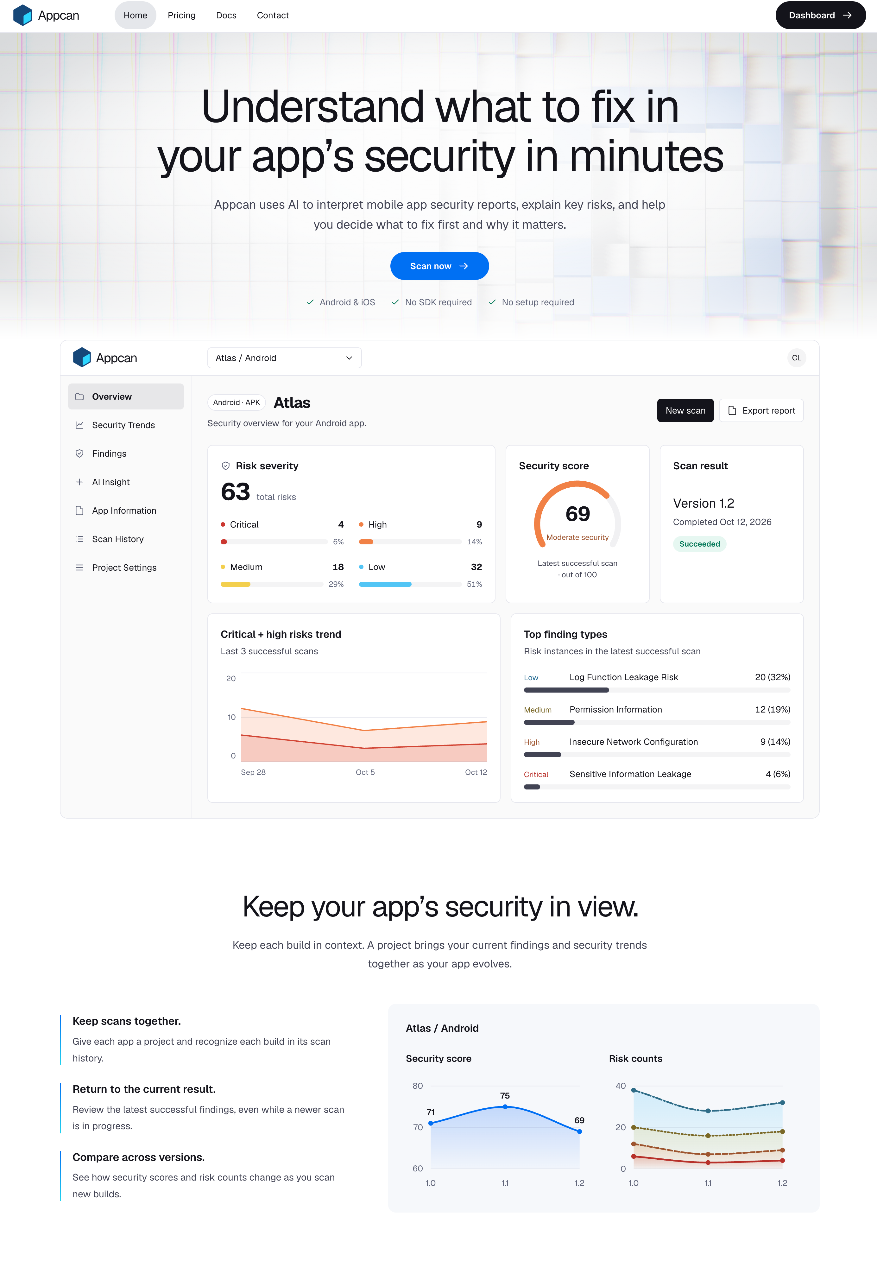
Mobile developers often struggle to interpret raw security scan outputs and prioritize what requires immediate attention. Appcan solves this by translating complex findings into practical, readable explanations. It gives each build an overall security rating out of 100 alongside clear risk classifications.
The platform pairs static analysis with AI Insight, which interprets findings within the context of your specific application type. It maps out potential business impact, highlights exact code or configuration evidence, and outlines concrete remediation steps to guide engineering decisions.
Who is it for?
Appcan is built for technical teams and builders who need visibility into their mobile security posture:
- Independent mobile developers wanting a fast security audit before releasing to app stores.
- Small and medium development teams tracking security regressions across release builds.
- Product leads who need plain-language security summaries to align engineering tasks.
- Engineering teams needing binary security checks without embedding third-party SDKs.
Key features
- Binary-Level Scanning: Upload standard Android APK or iOS IPA packages directly through the browser without sharing repository access or installing an SDK.
- AI Security Insight: Generates plain-language risk summaries that explain technical findings, their realistic impact, and what to fix first.
- Security Scoring and Breakdown: Calculates a 0 to 100 overall security score while grouping issues across Critical, High, Medium, and Low severity tiers.
- Trend Tracking Across Builds: Tracks security score changes and aggregate risk counts across successive builds organized by project.
- Configuration and Leak Detection: Spots issues including sensitive information leakage, debug mode settings, permission misuse, and insecure network configurations.
- Evidence and Remediation View: Displays specific configuration points alongside recommended code or settings changes to correct each issue.
- Standalone Report Exporting: Exports comprehensive security reports as standalone HTML files for offline reviews or team discussions.
How it works
- Create a project designated for either an Android or iOS application.
- Upload your compiled APK or IPA package directly through the web interface.
- Wait for the automated scan to evaluate dependencies, configurations, and permissions.
- Inspect the security score, view categorized findings, and generate an AI Insight summary for guidance on priority fixes.
Use cases
A developer preparing a new release upload checks their compiled build for exposed debugging flags, unencrypted endpoints, or hardcoded secrets before submitting to public app stores.
An engineering team building cross-platform products tracks separate iOS and Android project pipelines to verify that fixes deployed in one platform are mirrored securely on the other.
A technical manager exports an HTML security report to present a clean summary of critical vulnerabilities and recommended fixes during a sprint planning session.
Pricing
Appcan offers a Free plan and a monthly paid Pro subscription. The Free tier includes 2 lifetime successful scans, support for file sizes up to 50 MiB, up to 2 projects, and access to risk findings and remediation guidance. The Pro plan costs $9.99 per month and provides 30 successful scans per billing month, file uploads up to 200 MiB, unlimited projects, on-demand AI Insight, Pass finding details, and HTML report exports. Only successful scans consume scan credits; failed scans release their reserved credit.
FAQ
What file formats does Appcan support?
Appcan supports compiled Android APK files and iOS IPA files. You only need to provide the built application package, not source code.
Do I need to install an SDK or grant source code access?
No. Appcan works purely on your packaged application files via direct browser upload, so you never need to integrate an SDK or connect a Git repository.
How does Appcan count scan credits?
A credit is only consumed when a scan finishes successfully. If a scan fails, the reserved credit is released back to your account.
Are scan credits rolled over each month?
No. Unused credits on the Pro plan do not roll over to subsequent months, while the Free plan has a fixed lifetime allowance of 2 scans.
What happens to my data if I cancel Pro?
Your projects and historical risk findings remain accessible. New uploads will adhere to Free tier limits, and previously generated AI Insight reports remain readable.
Loading...
Related products
View all



More categories
All categories







Launched in Week 3, 2027
See the week
Explore Public AI Creations
0
AI Image Generation, Generative AI, AI
0
AI Image Generation, Generative AI, AI
76d14h57m
Launches in76days
:14hours
:57mins
:38secs

Unified AI API — 150+ models via one key, up to 95% off.
0
AI, API, Developer Platform
0
AI, API, Developer Platform
76d14h57m
Launches in76days
:14hours
:57mins
:38secs
Text to speech online powered by Gemini 3.8 TTS
0
AI Voice, Audio, Text to Speech
0
AI Voice, Audio, Text to Speech
76d14h57m
Launches in76days
:14hours
:57mins
:38secs