## When One Photo Isn't Enough for the Brief
A designer gets a usable product shot — good lighting, clean background, right garment — but the creative brief calls for three different angles, a different stance, maybe a softer head tilt for the hero banner. Reshooting is expensive or simply not possible if the model has moved on or the sample garment is gone. This is the moment teams start looking at pose-editing tools, and it's also the moment comparison gets sloppy, because every tool's landing page promises the same thing: upload a photo, change the pose, keep the rest. AI Pose Changer is one option in this space, and rather than describing what it claims to do, it's more useful to walk through the checklist a team should actually run before trusting any tool with production work.
## What the Workflow Actually Looks Like
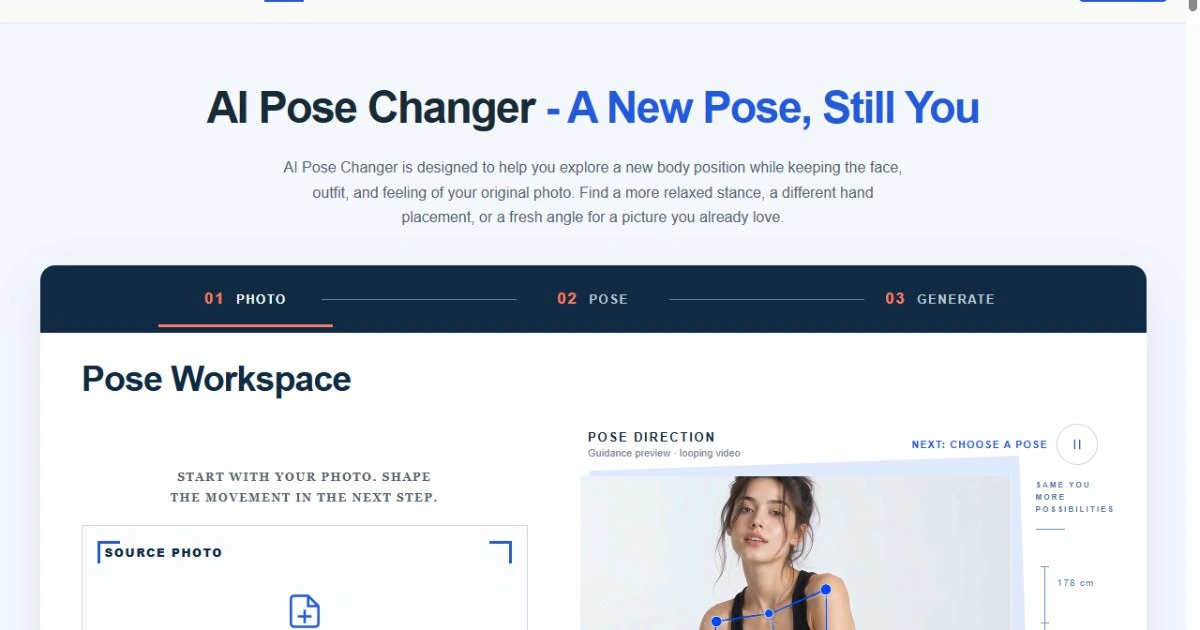
Most pose-editing tools follow a similar shape: you upload a source photo, you describe the pose you want or attach a reference image, the system generates a new version, and you review it against the original. According to the product page, AI Pose Changer follows this pattern — upload a photo, describe a new pose or add a reference, and generate an edited version with the stated goal of keeping identity intact. That's a reasonable workflow on paper, but the checklist worth applying isn't about the steps themselves, it's about what happens at each step:
- Does the tool let you describe a pose in plain language, or does it require a reference image every time? - When you adjust a position, does the face, body proportions, and clothing texture stay recognizably the same, or does the output drift into a generic rendering? - Can you nudge a result — a slight head tilt, a subtle shift in stance — without regenerating the whole image from scratch? - Is there a clear point in the process where you, not the model, decide whether the output is usable?
The product page for AI Pose Changer lists specific capabilities aligned with some of these points, including generating a pose direction, exploring body position, and applying a gentle head tilt as a refinement rather than a full regeneration. Those are the kind of granular controls worth checking for in any tool, since broad 'change the pose' prompts without finer adjustment options tend to produce results that need more correction than the time they saved.
## A Realistic Use Case
Consider a small creative team preparing a product page that needs four visual directions from one approved shot: a three-quarter turn, a seated variant, a version with arms relaxed at the side, and one with a slight head tilt for a lifestyle banner. Instead of scheduling a reshoot for each variant, the team uploads the approved photo, writes a short description for each target pose, and generates a batch of directions to review internally. This is the use case comparison checklists are built for — not 'does the tool work' in the abstract, but 'does it get us from one approved image to several reviewable directions without a new photo shoot.' Whether a given tool fits that use case depends less on marketing copy and more on how consistently it holds the subject's identity across edits, which is the next thing to check.
## The Review Step That Actually Matters
Before any generated image goes into a deck or a live page, someone on the team needs to do a side-by-side comparison: original photo next to each new pose. The questions to ask are specific, not general — does the face still match the same person, do proportions look physically plausible, does the clothing fold the way fabric actually folds in the new position, and does the lighting direction stay consistent with the original shot. A tool that passes this review on most attempts saves real iteration time. A tool that requires heavy manual correction on every output isn't actually faster than a reshoot, it just moves the labor from a studio to an editing queue. This review step should happen before a direction is shared with a client or stakeholder, not after.
## Where This Leaves the Comparison
No single feature list settles whether a pose-editing tool fits a given workflow — that depends on how well it performs against the checklist above for your specific source photos and target poses. If a team is weighing options, it's worth running the same source image through two or three tools, applying the review step consistently, and judging based on what actually holds up rather than what the landing page promises. For teams that want to test this directly, AI Pose Changer is accessible online, and running one real photo through its described workflow is a more reliable way to judge fit than reading any comparison article, including this one.