You shipped on Tuesday. A new API endpoint, the one you hacked on for three weekends straight. You got 12 signups. Six of them opened your docs. And they saw it: the same default-blue Mermaid.js diagram every other bootstrapped project has used since 2022. It works. But it screams "side project." It doesn't look like your app. It doesn't feel like your brand.
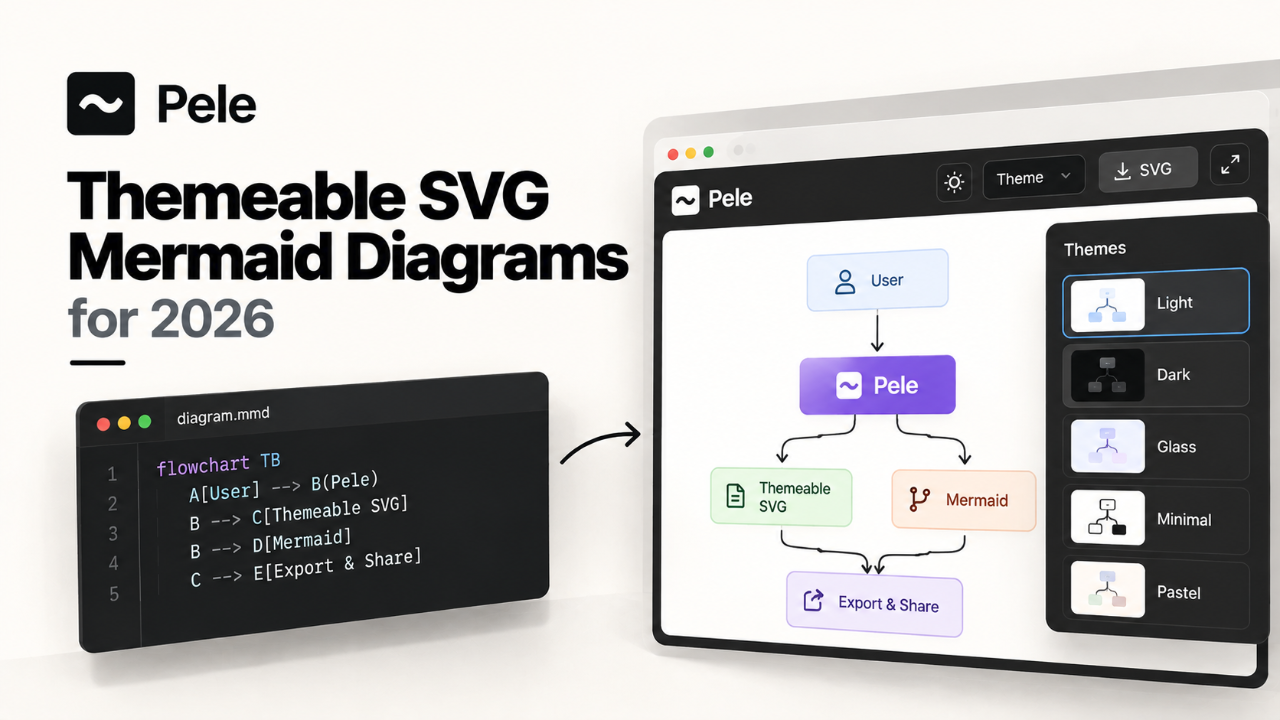
This morning, a link hit the top of Hacker News: "Pele – Mermaid diagrams as themeable SVG". Most new tools are a distraction. A rabbit hole of configuration that ends with you having a cool new hammer but no house. This one is different. This one is a scalpel. It solves a small, annoying problem that's been nagging at the back of your mind for months. It makes your docs look like they belong to your product.
What Actually Shipped
Let's be clear about what Pele is and isn't. It's not another diagramming library you have to learn. It's not a replacement for Mermaid's syntax, which you already know. Pele is a build-time tool. A post-processor. It takes the Mermaid text files you already have and renders them into static, themeable SVG files.
The key words there are static and themeable.
Static: Unlike the standard Mermaid.js library that runs in the user's browser, Pele generates the final SVG file during your build process. There's no client-side JavaScript to render the diagram. The browser gets a plain .svg file. It's fast. Blazingly fast. Your Largest Contentful Paint score will thank you.
Themeable: This is the real magic. The standard Mermaid library can be themed with a JSON object, a clunky process that feels like wrestling with a ghost. Pele-generated SVGs are structured with clean class names and, more importantly, are designed to be styled with CSS custom properties (variables).
This means theming your diagrams is as simple as writing a few lines of CSS:
/* in your global stylesheet */
:root {
  --pele-node-fill: #f8f8f2;
  --pele-node-stroke: #44475a;
  --pele-text-color: #282a36;
  --pele-arrow-color: #6272a4;
  --pele-font-family: 'JetBrains Mono', monospace;
}
Change your brand colors in one place, and your diagrams update. It's the "it just works" moment you're looking for. The tool itself is a simple CLI. You install it via npm and run it against your Mermaid files. No complex servers, no daemons. Just input and output.
Why a Solo Founder Should Care
You have a finite number of hours. Every tool you adopt has to justify its existence by saving you time or making you money. Pele does both, indirectly.
1. Perceived Value and Trust. Polished documentation is a signal. It tells potential customers that you care about the details. That you're a serious builder. When a developer is deciding between your API and a competitor's, a clean, branded, fast-loading documentation site can be the tie-breaker. It builds trust before they've written a single line of code.
2. Performance is a Feature. We've all landed on docs sites that feel sluggish. Often, it's the client-side rendering of diagrams or code examples that causes layout shifts and slow paint times. By shipping static SVGs, you eliminate an entire class of performance problems. Your pages load instantly. The content is there. This is especially critical for users on slower connections or mobile devices.
3. Control Without the Cost. The alternative to generic diagrams used to be firing up Figma or Illustrator. That's a context switch you can't afford. It breaks your flow. Worse, it creates assets that are a pain to update. Need to change one word in a diagram? Back to Figma. With Pele, your diagrams live as text right alongside your code and content. They're version-controlled. They're easy to update. You get the polish of a custom design without the workflow overhead.
4. It Fits Your Stack. You're probably already using a static site generator like Astro, Next.js, or Eleventy. Pele slots directly into that build process. It's another command you run in your `package.json` build script. It's not a new service to manage or a new paradigm to learn. It respects the workflow you've already perfected for shipping fast.
This isn't about vanity. It's about reducing friction for your users and building a cohesive product experience. For a solo founder, your product's presentation is an extension of your own credibility. It’s a classic solo founder challenge: finding leverage points that offer an outsized return on effort. Polishing your documentation is one of them.
How to Try It in a Day
Talk is cheap. Let's make this concrete. You can go from zero to a fully themed diagram in under an hour. Here's the plan.
Step 1: Install the CLI
This assumes you have Node.js installed. Open your terminal.
npm install -g pele-cliThis installs the `pele` command globally. You could also install it as a dev dependency in your project, which is a better practice for long-term use: `npm install --save-dev pele-cli`.
Step 2: Grab a Diagram
Find an existing Mermaid diagram in your docs. If you don't have one, use this classic user flow. Save it as `flow.mmd`.
graph TD
    A[User visits site] --> B{Has account?};
    B -- Yes --> C[Logs in];
    B -- No --> D[Signs up];
    C --> E[Dashboard];
    D --> E[Dashboard];
Step 3: Render It
Run the Pele CLI on your file.
pele --input flow.mmd --output diagram.svgYou now have a file named `diagram.svg`. If you open it in a browser, it'll look... a lot like a default Mermaid diagram. The magic isn't in the default output; it's in the structure that enables theming.
Step 4: Theme It
This is the payoff. Pele's SVGs are built to be styled externally. Create a `style.css` file and link it from an HTML file that embeds your SVG.
First, create `index.html`:
<!DOCTYPE html>
<html>
<head>
  <title>Pele Test</title>
  <link rel="stylesheet" href="style.css">
</head>
<body>
  <h2>My Themed Diagram</h2>
  <img src="diagram.svg" alt="User flow diagram">
</body>
</html>
Now, create `style.css` and define your brand. Let's use a dark theme.
:root {
  --pele-bg: #1e1e1e;
  --pele-node-fill: #2d2d2d;
  --pele-node-stroke: #5a5a5a;
  --pele-text-color: #d4d4d4;
  --pele-arrow-color: #6a9fb5;
  --pele-font-family: "SF Mono", "Consolas", monospace;
  --pele-font-size: 14px;
}

body {
  background-color: var(--pele-bg);
  color: var(--pele-text-color);
  font-family: sans-serif;
  padding: 2rem;
}
Pele's SVGs look for these CSS variables. If you open `index.html` now, you'll see a diagram that matches your theme. No JSON, no build flags. Just CSS. This is a huge workflow improvement. It means your diagrams can now live in harmony with the rest of your design system.
For a production site, you'd likely integrate the `pele` command into your static site generator's build pipeline, processing a whole directory of `.mmd` files at once. You are already shipping a high-quality product; now is the time to ensure its documentation, a crucial part of your user onboarding, reflects that same quality. Getting this right is a step towards getting your project featured in directories like the developer tools category on Builtbyindies.
The Catch
Pele is a sharp tool, but it has sharp edges. Adopting it in 2026 means you are an early adopter. Here's what you need to watch out for.
It's Static. Really. The biggest trade-off is interactivity. The standard Mermaid.js library supports `click` events, letting you link nodes to URLs or trigger JavaScript functions. This is great for building interactive walkthroughs or linking diagram elements to specific documentation pages. Pele output is a static image. Those `click` events are gone. If you rely on them, Pele is not a drop-in replacement. You'd have to add that interactivity back yourself with JavaScript, which is probably more work than it's worth.
It's a Build-Time Dependency. For most of us building with modern front-end stacks, this is a feature. But if your "stack" is just a folder of HTML files you edit and FTP to a server, adding a Node.js-based build step is a significant increase in complexity. You have to be comfortable with the command line and `package.json` scripts.
Potential for Theming Drift. The CSS variable system is powerful, but it's not magic. Pele has its own set of variables (`--pele-node-fill`, etc.). You still need to map your application's design tokens to Pele's variables. It's a small but crucial bit of work to maintain that mapping as your brand evolves.
What Breaks in Production?
If you swap out Mermaid.js for Pele today, what's the first support ticket you'll get?
"The diagram links are broken." Any user who bookmarked a URL that relied on a `click` event in a diagram will find it's now just a static image. You need to audit your existing diagrams for interactivity before migrating.
Font Rendering. Your Pele SVG will use the `font-family` you specify, but it doesn't bundle the font file. If your `style.css` calls for 'Inter' but you don't have a `` to Google Fonts or a self-hosted font file, the browser will fall back to a default, and your beautiful diagram will look wrong. Ensure your fonts are loaded correctly on any page that displays a Pele SVG.
Complex Diagram Failures. Pele is new. While it aims for 100% compatibility with Mermaid syntax, it's almost certain that some esoteric chart types or syntax edge cases might not render correctly yet. Test it with your most complex diagrams first, not your simplest.
The Verdict: Is It Worth Switching?
The answer depends entirely on what you're using diagrams for. I've broken down the trade-offs between the main options for rendering Mermaid diagrams today.
Capability | Mermaid.js (Client-side) | Mermaid CLI (Server-side) | Pele (Build-time) |
|---|---|---|---|
Theming | Clunky (JSON) | Clunky (JSON) | Easy (CSS Vars) |
Interactivity | Yes (Click events) | No | No |
Performance (LCP) | Poor (JS render) | Excellent | Excellent |
Build Dependency | No | Yes (Node.js) | Yes (Node.js) |
Output | Live DOM | PNG / SVG | Themeable SVG |
Here's my take:
For documentation, blog posts, and static content: Yes, absolutely. This is Pele's sweet spot. The performance and branding benefits are massive, and the lack of interactivity is rarely a problem in these contexts. For any new project, start here. This is the kind of thoughtful tool that distinguishes a well-made product, one that could be a strong contender on a launch platform like Builtbyindies.
For in-app diagrams that need to be interactive: No. If you need users to click on nodes to navigate or trigger actions within your application, stick with the client-side Mermaid.js library. The cost of re-implementing that interactivity yourself outweighs Pele's benefits.
For existing docs with simple, non-interactive diagrams: Yes, it's a worthy weekend project. The migration path is straightforward, and the payoff in brand consistency and site performance is well worth a few hours of work.
Pele isn't a revolution. It's a refinement. It's a sharp, focused tool created to solve a problem that many of us have just learned to live with. It won't build your product for you, but it will make the part of your product that teaches users how to succeed look a hell of a lot better. And for a solo founder, every bit of polish counts.
Give it an hour. Your docs, and your users, will thank you.