Building SwiftBuilder: Bringing AI-Powered Swift Development to iPhone and iPad
The Idea Behind SwiftBuilder
As an Apple-platform software engineer, I’ve spent years building iOS applications and working with Swift, SwiftUI, and UIKit. During that time, I started thinking about an interesting question: could developers experiment with Swift code and explore app ideas directly from an iPhone or iPad, even when they don’t have access to a Mac?
That question became the starting point for SwiftBuilder.
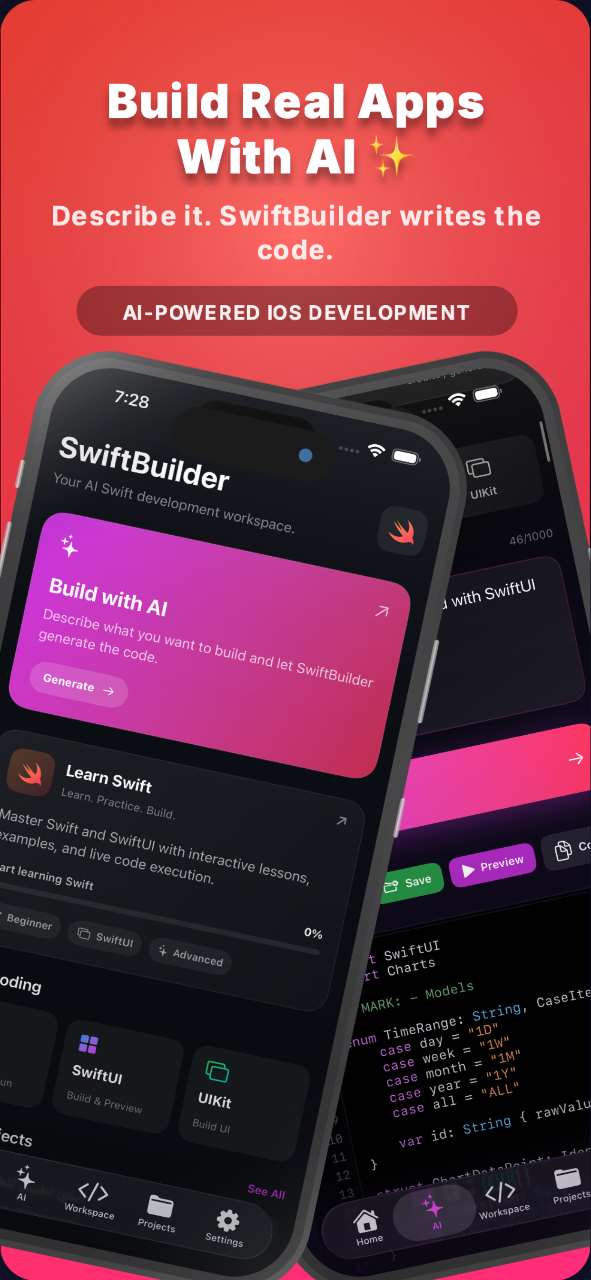
SwiftBuilder is an AI-powered development workspace designed to make experimenting with Swift more accessible on mobile devices. It brings AI-assisted code generation, code repair, online SwiftUI previews, and learning resources into one experience.
The goal isn’t to replace Xcode or pretend that mobile development has no limitations. It’s to give developers another way to explore ideas, learn, and prototype interfaces wherever they are.
More Than Just AI Code Generation
Generating code with AI is becoming increasingly common. However, producing a block of Swift code is only one part of the development process.
Developers also need to understand the generated code, identify problems, iterate on their ideas, and see how an interface might look. That’s why I wanted SwiftBuilder to go beyond a simple prompt-and-response experience.
With SwiftBuilder, users can describe an idea in natural language and generate Swift or SwiftUI code. When they encounter coding problems, AI-assisted repair can help them work through potential fixes. Learning resources also provide a way to explore Swift concepts while experimenting.
These features are designed to support the development process rather than promise that every generated result will be perfect.
The Engineering Challenge: Online SwiftUI Previews
One of the most interesting challenges is giving users a visual preview of generated SwiftUI interfaces on a mobile device.
SwiftUI is part of Apple’s development ecosystem, and rendering real SwiftUI code is different from simply displaying a web mockup that looks like an iOS application.
SwiftBuilder uses an online rendering workflow to process preview requests. Instead of requiring the iPhone or iPad to run a local Xcode preview session, the rendering work takes place through an online pipeline.
This approach introduces its own engineering considerations, including backend communication, build and rendering workflows, error handling, and delivering the resulting preview image back to the user.
It also means that the experience depends on the online service and the generated code being suitable for the preview workflow. Not every project or framework combination can be assumed to work automatically.
For me, this is an important distinction: the goal is to provide a meaningful visual feedback loop while being honest about how the technology works.
Building the Infrastructure Behind the Experience
A mobile AI development tool needs more than a good interface. It also needs backend infrastructure that connects the app to AI services and handles requests reliably.
SwiftBuilder brings together an Apple-platform client, backend services, and an online preview workflow. Working across these components means thinking about how requests move through the system, how errors are handled, and how the user experience behaves when something goes wrong.
AI-generated code can contain mistakes, and external AI services can experience delays or availability issues. These are practical challenges that need to be addressed as part of building a reliable product.
I see this as an ongoing engineering process rather than a problem that can be solved with a single AI prompt.
Who Is SwiftBuilder For?
SwiftBuilder is designed for several types of users:
iOS developers who want to explore ideas away from their main development machine.
Beginners who are learning Swift and SwiftUI.
Indie makers who want to experiment with interface concepts.
Developers who want to explore AI-assisted coding workflows.
Apple-platform enthusiasts who enjoy building and learning through experimentation.
Whether you’re exploring your first SwiftUI screen or testing an idea for a new application, the objective is to make that initial experimentation more accessible.
What I’ve Learned From Building It
One of my biggest takeaways is that building an AI-powered product involves much more than integrating an AI API.
The real work is designing the experience around the technology: deciding what happens when generation fails, how users can recover from coding errors, how previews are produced, and how to communicate limitations clearly.
Another lesson is that a useful developer tool should help people understand and improve their work, not simply generate output. AI can accelerate experimentation, but developers still need to review code, understand architectural decisions, and test applications properly before using them in production.
There is still plenty of room to improve the experience, and feedback from developers is an important part of that journey.
What’s Next?
I’m continuing to develop SwiftBuilder with the goal of making mobile Swift experimentation more useful for developers and learners.
I’d especially like to hear from people who build iOS applications and have experience with SwiftUI, AI coding tools, or online development environments.
What would you want from a tool that lets you explore Swift development directly from an iPhone or iPad? Would you prioritize better previews, more reliable code generation, debugging assistance, learning features, or something completely different?
I’d love to hear your thoughts and learn what would make this kind of workflow genuinely valuable.
Try SwiftBuilder
If you’re curious about the project, you can explore it here:
Website: https://swiftbuilder.app
App Store: https://apps.apple.com/us/app/swiftbuilder-ai-code-studio/id6795318447
SwiftBuilder is an ongoing project, and I’m excited to keep improving it. Thanks for reading, and I’d love to hear what you’re building!