You shipped on a Tuesday. By Friday, you had twelve signups, two of whom used their real email address. The app is a simple API wrapper around a niche dataset. You built it in a weekend with SvelteKit and deployed it to one of the big platforms. But now you’re getting emails about “team limits,” “pro plans,” and “serverless function execution caps.” Your simple wrapper is suddenly tangled in the ecosystem of a Massively Capable Platform you never asked for.
Then you saw the Hacker News thread: “Pi.dev: You Said No MCP.”
The title alone felt like a statement. In an era where every dev tool wants to be your everything-platform, Pi.dev did the opposite. They had been building a new, all-in-one cloud, promising to bundle hosting, databases, auth, and AI inference into a single seamless experience. The kind of thing that gets a nine-figure valuation before shipping a single line of code. But the community—on Hacker News, on Indie Hackers, in their Discord—pushed back. The feedback was clear: we don’t want another walled garden. We don’t want your second-rate integrated database. We just want to run our code.
They listened. Instead of the “Massively Capable Platform” (MCP), they shipped a single, sharp tool. And for the solo founder shipping this week, it changes everything.
What Actually Shipped
Pi.dev didn’t ship an ecosystem. They shipped a command.
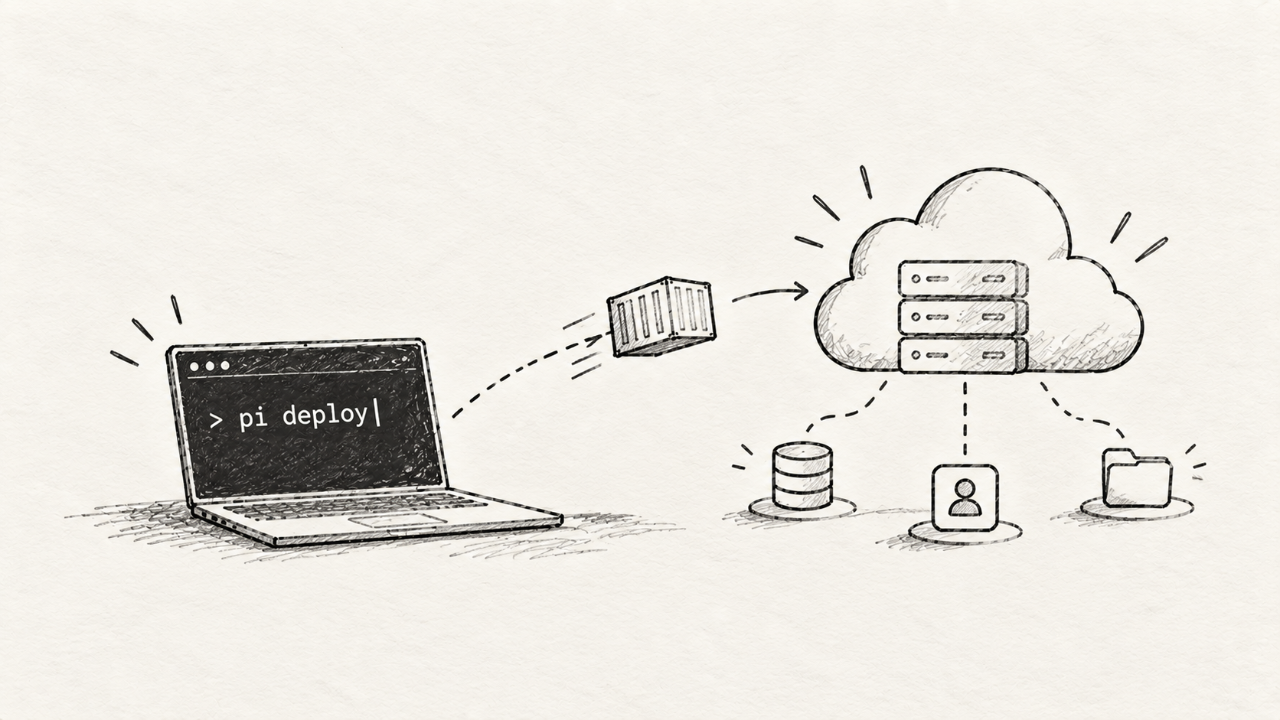
pi deploy
That’s it. That’s the product. Pi.dev is a hyper-focused deployment service that does one thing: it takes your code, builds a container, and runs it on a global edge network. Fast.
There is no built-in PiDB. No managed PiAuth. No first-party Pi-AI-Functions. It’s aggressively, almost confrontationally, a “bring your own backend” service. It’s the modern-day equivalent of Heroku’s original git push heroku main, but stripped of the cruft and pricing models that accumulated over a decade. It assumes you’re smart enough to choose your own tools.
The platform runs standard containers. It doesn’t care if it’s a Node.js API, a Go binary, a Python script, or a Rust web service. If it can be containerized, Pi.dev can run it. Configuration lives in a simple pi.toml file in your root directory, and it’s refreshingly sparse.
This isn’t a PaaS (Platform-as-a-Service) in the 2023 sense of the word. It’s CaaS (Container-as-a-Service) with the developer experience of a frontend framework. It’s a deployment target, not a life partner.
Why a Solo Founder Should Care
Your most valuable resource is focus. Not money, not time, but pure, unadulterated focus. The cognitive overhead of learning another complex, proprietary ecosystem is a tax on that focus. Pi.dev’s rejection of the MCP model is a direct investment in your ability to concentrate on what matters: your product.
Here’s why it matters for your next weekend project:
Composability is King. The web is unbundling. The best database is probably not from your hosting provider. The best auth service is a dedicated product. The best AI models come from their own APIs. Pi.dev embraces this. It forces you to think in a composable way from day one. You can pick the absolute best-in-class tool for every part of your stack—Neon for Postgres, Clerk for auth, Anthropic for your LLM—without being penalized.
No Lock-in. Zero. Because Pi.dev just runs a standard container, you are never locked in. If you outgrow it or they change their pricing, you can take your Dockerfile to any other container host. This is not a trivial point. It means you own your architecture. The platform serves you, not the other way around.
Predictable, Usage-Based Cost. The business model is simple. You pay for the CPU and memory you actually use. There are no confusing “pro plans” that unlock arbitrary features like custom domains. The free tier is generous on the compute itself because they aren’t subsidizing a dozen other money-losing services.
Mental Simplicity. You don't need to think about what Pi.dev is. It runs your web server. End of story. This frees up brain cycles to think about your actual application logic, your users, and how you’re going to get your next ten signups. Perhaps by launching on a platform for makers.
This is a return to the Unix philosophy: do one thing and do it well. In a world of bloated software, a sharp tool is a competitive advantage.
How to Try It in a Day
Let’s deploy a simple Node.js app. This entire process should take less than ten minutes.
First, create a dead-simple Express server. Save it as app.js.
const express = require('express');
const app = express();
const port = process.env.PORT || 3000;

app.get('/', (req, res) => {
  res.send('Hello from Pi.dev!');
});

app.listen(port, () => {
  console.log(`App listening on port ${port}`);
});
You'll also need a package.json. Run npm init -y and npm install express.
1. Install the CLI and Login
The entire interface is a global command.
npm install -g pi-cliThen, log in. This will open your browser for a standard device authorization flow.
pi login2. Configure Your App
Create a pi.toml file in your project’s root. This is where you tell Pi.dev how to build and run your code. For our Node.js app, it's incredibly simple.
# pi.toml

[app]
name = "my-first-pi-app"

[deploy]
start_command = "node app.js"
port = 3000
Pi.dev’s build system will automatically detect the package.json and run npm install. For other languages, you might add a [build] section with a custom command. But for Node, this is all you need.
3. Deploy
This is the magic part. From your project's directory, run:
pi deployYou’ll see output as Pi.dev builds your container, pushes it to its registry, and deploys it. In about 45 seconds, you’ll get a URL.
> Build complete.
> Deploying container...
> Deployment successful.
> Your app is live at: https://my-first-pi-app-a1b2c3d4.pi.dev
That’s it. You’re live. No git repo connection required for the first deploy (though you can set it up for CI/CD). It’s designed for immediate feedback.
Managing environment variables is just as direct. No fumbling through a web UI.
pi env set DATABASE_URL="postgres://..."This is a tool built for people who live in the terminal. It respects your workflow and gets out of the way.
The Catch: You Are the Systems Integrator
There is no free lunch. The simplicity of Pi.dev comes with a significant trade-off: you are responsible for everything except the compute.
This is the "catch." Pi.dev is not a cozy, all-inclusive resort. It's a pristine, empty plot of land with electricity and water hookups. You have to build the house.
What breaks in production is anything you took for granted on an integrated platform. When you move to a tool this focused, you quickly realize how many invisible services you were using.
Databases are your problem. There is no one-click Postgres add-on. You need to provision a database from a provider like Neon, PlanetScale, or Supabase, secure it, and manage the connection string yourself. This isn't hard, but it's an extra step that platforms like Heroku or Vercel abstract away.
No persistent file storage. Like almost all modern container platforms, the filesystem is ephemeral. If you need to store user uploads, you must integrate with an object storage service like AWS S3 or Cloudflare R2. There is no built-in solution.
You bring your own add-ons. Need a Redis cache? A message queue? A logging service? Find a provider, sign up, and add the credentials to your environment variables. The rich "add-on marketplace" model doesn't exist here. You have to browse tooling categories and integrate them yourself.
Cron jobs are just another process. There’s no fancy UI for scheduling tasks. You’ll likely define a second app type in your
pi.tomlfor a worker or use a service like Cron-Job.org that calls a webhook. It's flexible, but requires you to design the solution.
This isn't a flaw in Pi.dev; it's the entire point. It trades convenience for control. It bets that you, the founder, are capable of being a systems integrator. For many, that's a good bet. For others, it's a deal-breaker.
Is It Worth the Switch?
Yes, but not for everything.
For new projects, especially backend APIs and stateless services, Pi.dev is a phenomenal choice. Its speed and simplicity are a superpower when you’re trying to get from idea to a live URL. It aligns perfectly with the solo founder’s need to ship fast and stay lean. If you're starting a new project in 2026, you should be building with a composable mindset anyway. Pi.dev is the ideal deployment target for that philosophy. It's the perfect home for your Next.js app, your Astro site's backend, or your AI wrapper API.
For existing, stable applications, do not switch. The single biggest mistake a productive founder can make is to refactor or migrate something that already works. If your app is humming along on Vercel or Render and you understand the cost model, stay there. Your time is better spent talking to users than updating DNS records. The only reason to consider migrating an existing app is if you are facing crippling costs or specific performance limitations on your current platform’s compute layer.
The litmus test: If your application is mostly stateless and you're comfortable managing your own database and other services, Pi.dev is a breath of fresh air. If you rely heavily on your platform's integrated database, serverless storage, and add-on ecosystem, the migration would be a painful, low-value rewrite.
Pi.dev is a statement. It’s a bet that developers are tired of being sold ever-expanding ecosystems. It's a bet on the unbundling of the cloud, and a belief that the best stack is one you assemble yourself from best-in-class components. For indie hackers and solo founders who value speed, control, and focus, that’s not just a good bet—it’s the future. Find your tools, build your stack, and use a service like Pi.dev to simply run the code. Then get back to what matters: building a product people want.