You’re staring at your Stripe dashboard. Twelve signups since you launched on Tuesday. Not bad. But user feedback is already rolling in. A few people have asked for a way to transcribe the audio notes they upload. You scope it out: AssemblyAI, Deepgram. The APIs are incredible, but the per-minute pricing gives you anxiety. At your current scale, it’s fine. If you get a surprise traffic spike from Hacker News? You’ll owe them a credit card and a kidney.
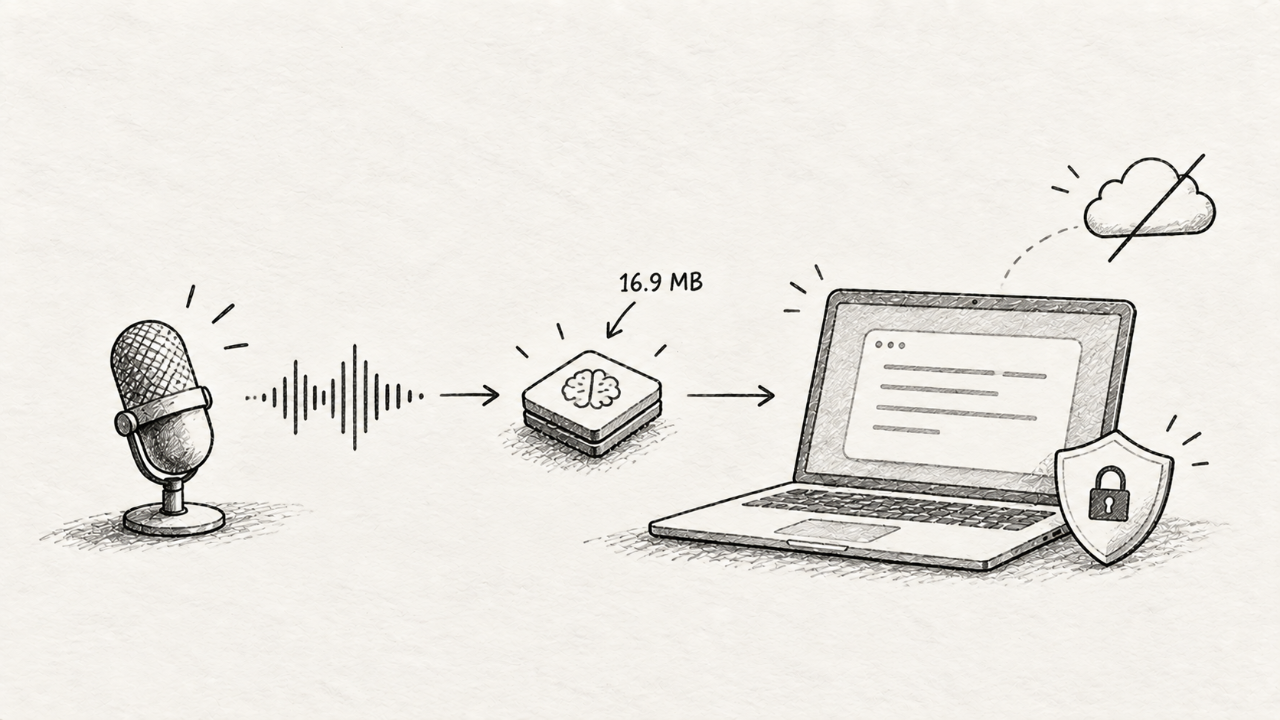
Then, a post hits the front page: "Whistle: Speech to Text in 16.9 MB."
The comments are a mix of disbelief, excitement, and the usual skepticism. But for a solo founder shipping in 2026, this isn't just a cool demo. It’s a tactical shift. It means a category of features that were once reserved for venture-backed teams with a budget for cloud GPUs are now on the table for a weekend project.
This isn't another overhyped model. It's a tool that lets you build differently. Let's cut through the noise and figure out if you should be using it this week.
What Actually Shipped
Whistle isn't a new breakthrough in AI architecture. It's a triumph of engineering and optimization. The team behind it took a larger, more complex speech-to-text model—likely a transformer-based architecture similar to OpenAI's Whisper—and aggressively distilled and quantized it.
Think of it like this: they took the "knowledge" of a 1.5 GB graduate-level model and compressed it into a 16.9 MB field guide. You lose nuance, but you gain portability.
What you get is not a cloud service. It's a self-contained library. At its core is a C++ engine, which is why it's so fast and light. But you don't need to touch C++. The project shipped with bindings for the languages you actually use:
Python:
pip install whistle-transcriberJavaScript/TypeScript:
npm install @whistle-ai/web(for browsers, via WebAssembly)Swift & Kotlin: Native packages for building directly into iOS and Android apps.
The key takeaway: this is a model that runs on the user's device. Your server is never touched. The audio file never leaves their machine. This isn’t just a technical detail; it's a product strategy.
Why a Solo Founder Should Care
Big models are impressive, but small models are useful. For an indie hacker, "useful" means shipping features that solve problems without creating new ones—like a terrifying server bill.
Whistle matters for four reasons:
Zero Per-Minute Cost. This is the big one. Your costs are fixed. You serve the model files once—either bundled with your app or downloaded on first use—and that's it. Whether a user transcribes one minute or one hundred hours of audio, your AWS bill doesn't change. This lets you offer transcription features generously, or even for free, as a competitive advantage.
Privacy as a Feature. "Your data never leaves your device." For years, this was a slogan for a handful of privacy-focused apps. Whistle makes it a technical reality for any app. If you're building a therapy journal, a meeting notes app, or anything that handles sensitive conversations, on-device transcription is a killer feature. You can build truly private-by-default products without having to write a single word in your privacy policy about third-party subprocessors for transcription.
Instantaneous Speed. Cloud APIs are fast, but they're still bound by the speed of light. You have to upload the file, wait in a queue, process, and download the result. Whistle runs on the local CPU. For short audio clips—like voice commands or a quick note—the transcription can feel instantaneous. This unlocks interactive use cases that would feel sluggish with a round-trip to the cloud.
Offline-First Capability. Your app's new transcription feature now works on a plane, in a subway, or in a cabin with spotty Wi-Fi. This is a massive product differentiator that cloud-tethered competitors simply can't match. It moves your product from a "web app" to a "personal tool."
This isn't just about saving money. It's about enabling a class of applications that were previously impractical for a small team. It's a core component for building software on the principles of edge computing, even if you just call it "running on their computer."
How to Try It In a Day
Talk is cheap. Let's see what it takes to get from zero to a transcribed file. The JS library is the quickest way to get a feel for it, right in your browser's console or a simple HTML file.
First, grab the library.
npm install @whistle-ai/webNow, create a basic `index.html` file. We'll add a file input and a button. Then, we write the script to initialize Whistle and transcribe the audio.
<!DOCTYPE html>
<html>
<head>
  <title>Whistle Test</title>
</head>
<body>
  <h2>Test Whistle.js</h2>
  <input type="file" id="audio-file" accept="audio/*" />
  <button id="transcribe-btn">Transcribe</button>
  <h3>Transcript:</h3>
  <pre id="output"></pre>

  <script type="module">
    import { Whistle } from '@whistle-ai/web';

    const transcribeBtn = document.getElementById('transcribe-btn');
    const audioFileInput = document.getElementById('audio-file');
    const outputElem = document.getElementById('output');

    // The model is loaded from a CDN by default.
    // In a real app, you'd host this yourself.
    const model = await Whistle.load();

    transcribeBtn.addEventListener('click', async () => {
      const file = audioFileInput.files[0];
      if (!file) {
        outputElem.textContent = 'Please select a file first.';
        return;
      }

      outputElem.textContent = 'Transcribing...';

      // Transcribe and get the result.
      const result = await model.transcribe(file);

      outputElem.textContent = result.text;
    });
  </script>
</body>
</html>
Serve this file locally. Open it in your browser, pick an audio file, and click the button. The first time, it will take a moment to download and initialize the 16.9 MB model. Subsequent transcriptions will be much faster.
This is it. You just added on-device speech-to-text to a webpage in about 20 lines of code. No API keys, no server-side logic, no billing setup. It's a powerful demonstration of how quickly you can prototype and ship an AI feature when the model runs on the client.
The Catch: What Breaks in Production
Nothing is free. A 16.9 MB model comes with trade-offs. The Hacker News thread might be full of "hello world" demos, but production is where dreams meet reality. Here’s where Whistle will fail you.
Accuracy is "Good Enough," Not Great. Compared to a top-tier cloud API like Deepgram's Nova-2 or OpenAI's latest Whisper `large-v4` (coming in 2027), Whistle is noticeably less accurate. It will struggle with strong accents, domain-specific jargon (medical, legal), and multiple speakers talking over each other. If you record a podcast in a noisy cafe, the transcript will be messy.
Punctuation and Diarization are MIA. The base Whistle model focuses on one thing: getting the words down. It's not going to give you perfect commas and periods. It's certainly not going to tell you "Speaker A" said this and "Speaker B" said that (speaker diarization). You get a wall of text. Cloud APIs offer these as standard features.
Language Support is Limited. The tiny English model is 16.9 MB. The project offers a few other languages (Spanish, German), but the models are larger and less optimized. If you need to support a wide range of global languages, you're sticking with a cloud provider.
Device Performance is a Factor. While 16.9 MB is a small download, running inference still consumes CPU and RAM. On a new M5 MacBook Pro, it’s blazingly fast. On a five-year-old budget Android phone, transcribing a 10-minute file could make the UI lag and drain the battery. You are, in effect, borrowing your user's hardware. You have to be respectful of that.
In short: Whistle gives you a C+. For many applications, a C+ is a passing grade and all you need. But if your product's reputation hinges on an A+ transcript, this isn't your tool.
Whistle vs. The World: A Clear Framework
So, where does Whistle fit? Here's a side-by-side to help you decide what to use for your next project.
Model / Service | Location | Cost | Accuracy | Privacy | Best For |
|---|---|---|---|---|---|
Whistle | On-Device | Free (fixed) | Good | Excellent | Voice commands, quick notes, privacy-first apps |
Whisper (Self-Hosted) | Your Server | Server costs | Excellent | Good | Internal tools, high-accuracy needs without third parties |
Cloud API (AssemblyAI, Deepgram) | Cloud | Per-minute | State-of-the-art | Depends on provider | Core transcription products, multi-language, diarization |
Is It Worth Switching To? The Final Take
Yes, but not for everything. Don't rip out your AssemblyAI integration if it's working and your business depends on its accuracy.
Use Whistle today if you want to build:
A "voice command" palette for your desktop app. Accuracy for simple commands ("open new document," "save file") is high.
A "drafting" feature in a notes app. Let users speak a rough draft of a blog post or email. The quality is good enough for a first pass that they'll edit anyway.
A privacy-first audio journal. This is the killer app. A simple Electron or mobile app where users can talk about their day, and the audio is transcribed and stored locally, forever.
An accessibility feature for your existing product, allowing basic voice navigation.
Stick with a cloud API if:
Your business is selling transcripts. You need the best quality, period.
You need to support dozens of languages.
You need features like speaker diarization, topic detection, or real-time streaming transcription for live events.
Whistle isn't a replacement for big AI. It's a new tool in the toolbox. For years, indie hackers have been forced to either pay the "API tax" or avoid entire categories of products. A performant, 17 MB model that runs anywhere changes that equation.
It opens the door for a new wave of creative, useful, and private applications. The kind of tools that don't need a VC check to get started, just a developer with a free weekend. The kind of tools that get hunted on Product Hunt and fill a real niche. Maybe your next product is one of them. And when you're ready to show it to the world, you can launch it to a community of fellow makers who will get exactly what you've built, and why it matters.