FeatureImg
Design blog covers, social graphics, and preview cards
Screenshots
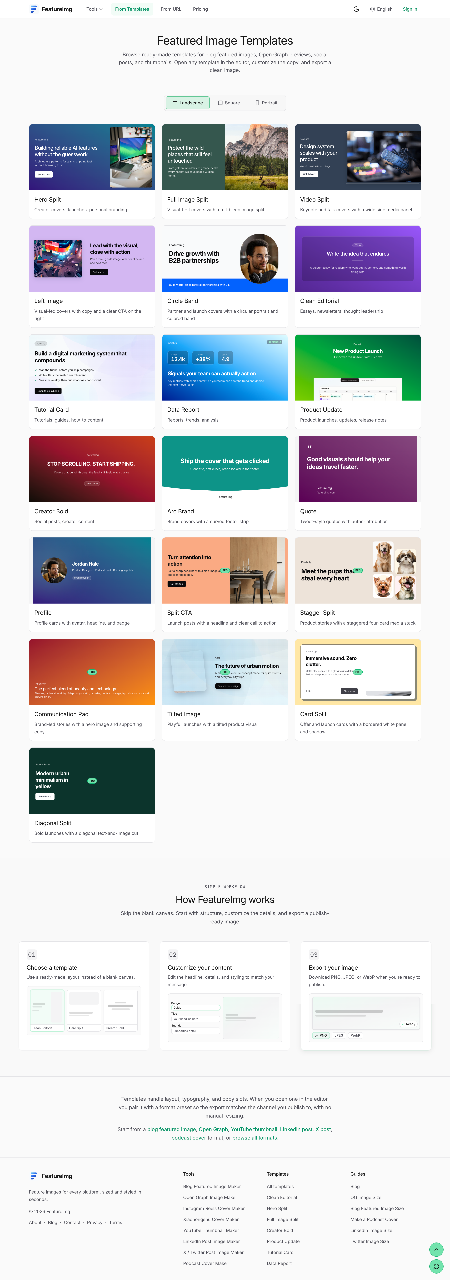
Freemium
Graphic Design
Creative Tools
Thumbnail Generator
Built with Next.js
What is FeatureImg?
FeatureImg is a web-based graphics generator built to produce structured visuals for online content. Instead of offering an unstructured blank canvas, the editor provides preset layouts tailored to digital publishing channels. It allows users to quickly format graphics for websites, social channels, and media feeds without manual dimension setup.
The application resolves the bottleneck of spending extensive time in general-purpose design software just to make clean article headers, video thumbnails, or preview cards. By focusing on fixed aspect ratios and structured text hierarchy, it speeds up the production of assets needed for everyday publishing schedules.
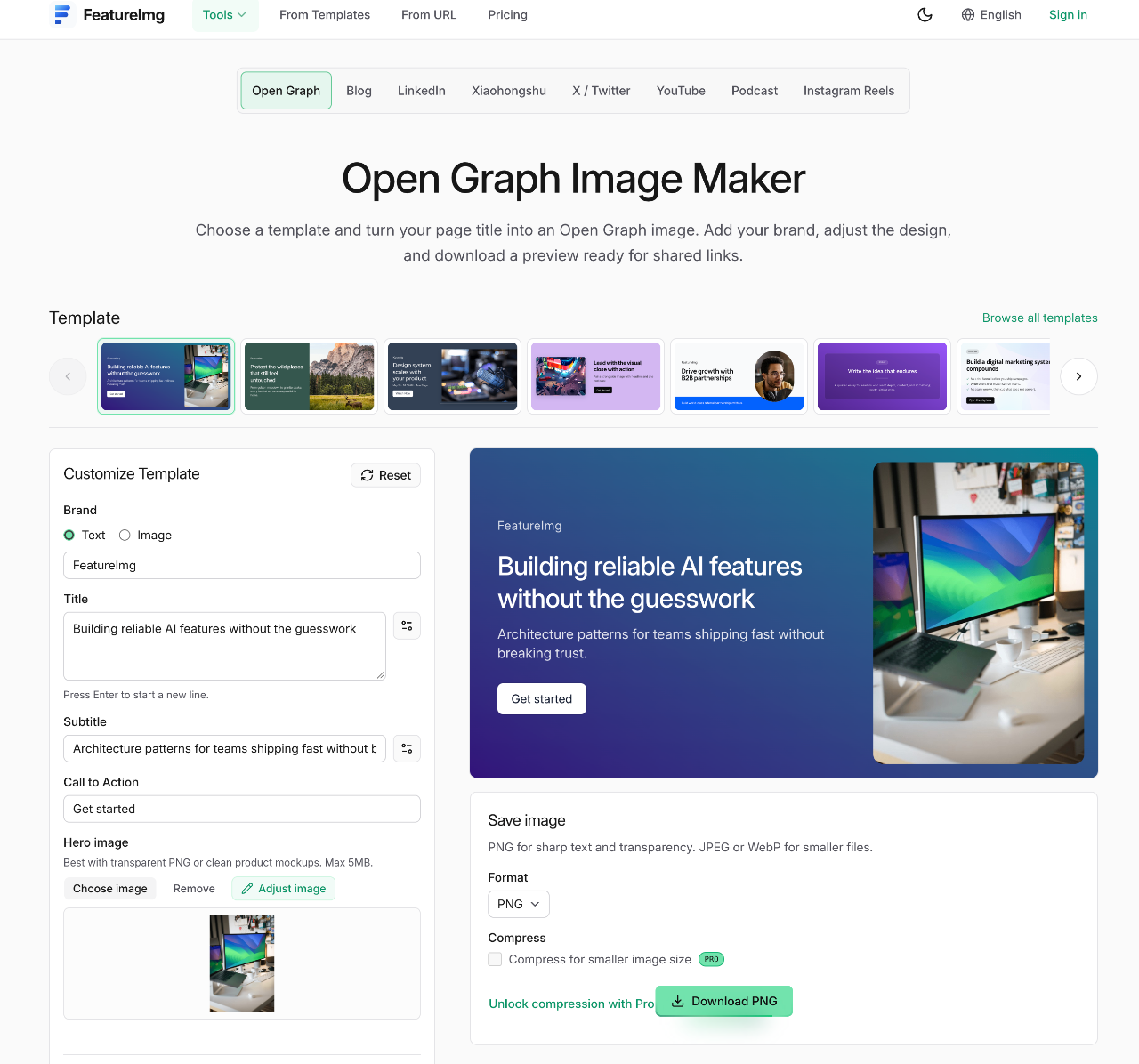
What sets FeatureImg apart is its structured approach to format requirements. Creators can start directly from a template or pull existing webpage metadata via a URL, adjust headlines and badges, and export optimized assets without creating an account.
Who is it for?
FeatureImg serves digital creators and publishers needing fast, standardized imagery:
- Bloggers and newsletter authors producing featured covers for articles.
- Independent software developers and indie hackers wanting link preview cards for product launches.
- Social media managers designing branded feed visuals for platforms like LinkedIn, X, and Xiaohongshu.
- Podcasters and video creators needing uniform cover art and YouTube thumbnails.
Key features
- URL-to-image extraction: Enter a live web link to pull page details directly into a template, cutting down on manual data entry.
- Format-specific presets: Choose layouts configured for Open Graph link cards, blog headers, YouTube thumbnails, podcast covers, and Instagram Reels grids.
- Structured templates: Start from organized editorial frameworks, split layouts, and bold styles rather than an empty design frame.
- Custom background presets: Style visuals using built-in gradients, shapes, and preset palettes directly in the browser interface.
- Flexible file exporting: Download finished designs in PNG, JPEG, or WebP formats according to site performance needs.
- Built-in image compression: Reduce file sizes on exported visual assets to maintain fast web page loading times.
- Frictionless editing: Make changes to text, badges, and layout backgrounds without requiring an account registration.
How it works
- Select a target format or enter a live website URL to automatically import page metadata into an initial layout.
- Choose a design template, then edit headlines, subheadings, badges, and background styling to suit your brand.
- Preview the finished asset directly in your browser and export your graphic in PNG, JPEG, or WebP format.
Use cases
A technical writer publishing a tutorial on a personal site can generate a blog header and Open Graph card simultaneously, ensuring shared links look clean across social networks.
A founder launching a side project can paste their product landing page URL to immediately generate branded social cards for announcements on X and LinkedIn.
A content marketer managing multi-platform channels can produce consistent video thumbnails and podcast episode artwork using matched layout themes.
Pricing
FeatureImg offers a Free plan that includes free templates, access to all background presets, and standard exports in PNG, JPEG, and WebP formats. The Professional plan unlocks Pro templates and built-in image compression for smaller file sizes, available for $5 per month on monthly billing or $30 per year on annual billing.
Alternatives
FeatureImg competes with OpenGraph.xyz, which focuses strictly on testing and generating link metadata images, whereas FeatureImg covers multiple aspect ratios like video covers and feed posts. Compared to Bannerbear, which centers on API-driven visual automation, FeatureImg emphasizes a manual, browser-based workflow without mandatory account setup.
FAQ
Do I need an account to use FeatureImg?
No, you can select templates, customize text, and download your exported images directly in the browser without signing up.
What file formats can I download?
The editor supports downloads in PNG, JPEG, and WebP formats.
Can I start an image from a URL?
Yes, you can paste a webpage URL to automatically import page details into a template layout.
What is included in the Free plan?
The Free plan provides access to free templates, all background presets, and standard downloads across PNG, JPEG, and WebP formats.
What additional features come with the Professional plan?
The Professional plan includes all Pro templates along with image compression tools to produce smaller export file sizes.
Loading...
Related products
View all



More categories
All categories







Launched in Week 2, 2027
See the week
Fast AI video super-resolution to 4K online
0
AI Video, Video Editing, AI
0
AI Video, Video Editing, AI
69d13h56m
Launches in69days
:13hours
:56mins
:24secs

Build resumes and portfolios with AI and export to PDF free
0
Resume Builder, Portfolio, Career
0
Resume Builder, Portfolio, Career
69d13h56m
Launches in69days
:13hours
:56mins
:24secs

AI translation for documents and images
0
Translation, Natural Language Processing
0
Translation, Natural Language Processing
69d13h56m
Launches in69days
:13hours
:56mins
:24secs